
Avoiding Silent Errors in Google Sheets with ARRAYFORMULA
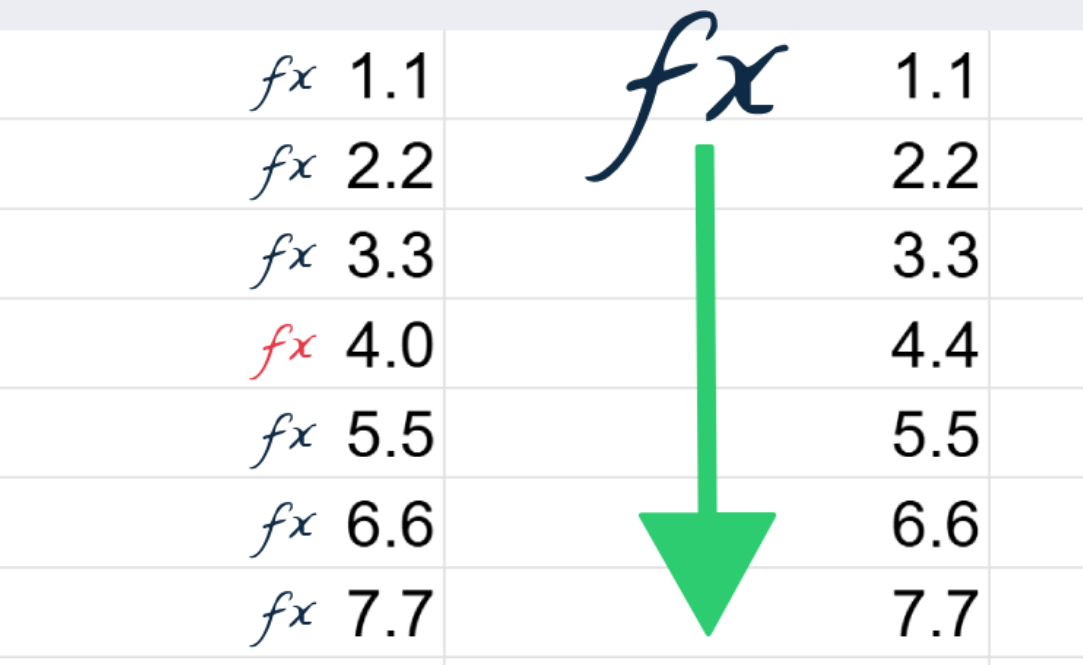
ARRAYFORMULA is one of the most misunderstood features in Google Sheets.
At first glance, it looks unnecessary. If you already know how to write formulas, copying a formula down a column feels simple and familiar. So why add extra syntax? Why change a pattern that has worked for decades? The answer is not convenience or speed. The real value of ARRAYFORMULA is design.
ARRAYFORMULA solves one of the oldest structural problems in spreadsheets: duplicating logic across rows.
ARRAYFORMULA allows a spreadsheet to apply a single formula to an entire range instead of duplicating the same logic row by row. By centralizing calculations in one place, ARRAYFORMULA reduces maintenance effort, prevents silent inconsistencies, and makes spreadsheets easier to scale and share.
The Core Problem with Traditional Spreadsheet Formulas
In a typical spreadsheet, logic is repeated row by row.
You write a formula in one cell, then copy it down dozens, hundreds, or thousands of rows. Every row contains its own copy of the same instruction.
Because this pattern is so familiar, it rarely gets questioned — despite being one of the most fragile anti-patterns in spreadsheet design.
Copying formulas down a column creates several hidden risks:
- Logic is duplicated instead of being defined once
- Small edits introduce silent inconsistencies
- Fixes must be applied everywhere instead of in one place
- Errors become harder to detect as sheets grow
Even experienced users underestimate how often this leads to mistakes — especially in shared or long‑lived spreadsheets.
If even one formula in a column is edited inconsistently, the entire spreadsheet can be wrong for months without anyone noticing.
ARRAYFORMULA Introduces a Single Source of Truth
ARRAYFORMULA enforces a single source of truth for spreadsheet logic. Instead of scattering identical formulas across rows, calculations are defined once and applied consistently. This makes errors easier to spot, updates safer to apply, and long‑lived spreadsheets more reliable.
ARRAYFORMULA changes the model.
Instead of copying logic down a column, you define the rule once, and let Google Sheets apply it to all relevant rows automatically.
That single formula becomes the single source of truth for the calculation.
This has important consequences:
- There is exactly one place to review or update the logic
- New data automatically follows the same rule
- Inconsistent rows cannot exist
- The sheet becomes easier to reason about and maintain
This is not about doing something you couldn’t do before. It’s about doing the same thing in a way that scales and makes a common category of mistake impossible.
ARRAYFORMULA Is About Architecture, Not Tricks
ARRAYFORMULA is often introduced through small examples or clever tricks, which can make it feel optional or niche.
It is frequently taught as a convenience — a way to save the effort of copying formulas. But this is not the real reason professionals use ARRAYFORMULA.
In practice, ARRAYFORMULA is used because it enforces better structure and de‑risks spreadsheet logic by removing the need to duplicate instructions:
- Logic is centralized
- Behavior is predictable
- Maintenance cost is reduced
- Risk of human error drops sharply
When you think in terms of design, ARRAYFORMULA stops being “extra syntax” and becomes a structural tool.
When ARRAYFORMULA Makes the Biggest Difference
ARRAYFORMULA is most valuable in spreadsheets that grow, are shared, or contain business‑critical logic. In these situations, copying formulas becomes fragile, while centralized logic provides predictability and reduces operational risk.
ARRAYFORMULA is especially valuable when:
- A sheet is shared with others
- Data grows over time
- Calculations are business‑critical
- Multiple columns depend on the same logic
In these cases, copying formulas is fragile. ARRAYFORMULA creates a safer default.
If you rely on accurate spreadsheets for critical business operations, copied formulas should be avoided — ARRAYFORMULA is the safer design choice.
What This Page Is For
This page is the foundation for all ARRAYFORMULA‑related content on Learning For Pros.
All ARRAYFORMULA fix‑it guides, debugging videos, and advanced patterns link back here. If you understand the idea of a single source of truth, the rest of ARRAYFORMULA will make sense.
In the accompanying video, you’ll see a simple demonstration of how ARRAYFORMULA replaces duplicated logic with a single, reliable rule.
What’s Next
In the next articles and videos, we’ll cover:
- How to implement ARRAYFORMULA safely
- Common ARRAYFORMULA mistakes and how to debug them
- Techniques for clean expansion and reporting
- Where ARRAYFORMULA stops working — and what to use instead
If you want to build spreadsheets that scale cleanly and predictably, ARRAYFORMULA is a core concept worth mastering.